Connecting Azure Sentinel API with elastic
- Roeland Braam

- 19 nov 2025
- 7 minuten om te lezen
When using Elastic as a single pane of glass for executing security monitoring, all other security products and cloud environments should be connected. This makes it easier for analysts to maintain an overview of alerts and perform incident triage.
Regarding Azure Sentinel, there is a supported Elastic integration for connecting to Azure Event Hub, which can be used to retrieve events from Sentinel. However, this integration comes with several challenges:
It uses AQMP protocol for data transport and does not support AMQP over WebSocket
Requires port 5671/TCP and 5672/TCP from agent to the Azure endpoint
IP addresses of the Azure endpoint can and will change over time
Requires a azure storage account for storing state/offset
Requires an EventHub (extra costs)
Requires configuration on Sentinel to forward events to Eventhub
These challenges often result in the connection becoming unavailable, which makes troubleshooting difficult. Several of our customers have experienced this repeatedly, causing Sentinel alerts to go unprocessed and creating a risk that attacks may go undetected.
We therefore wanted an alternative method for retrieving Azure Sentinel alerts by using the REST API interface. -> https://learn.microsoft.com/en-us/rest/api/securityinsights/?view=rest-securityinsights-2025-09-01
Using the Azure REST API has some advantages:
Less complex, so easier troubleshooting
Direct connection to Azure Sentinel using REST API, no special firewall changes required
Can route trough a proxy server
Uses client certificates for authentication so more secure
Requires almost no configuration on the Azure side.
Can also be used for retrieving vulnerability information
Many home-automation enthusiasts are familiar with Node-RED, often used for automating various tasks. That same Node-RED platform can also be used to automate workflows— including establishing the connection between the Sentinel REST API and Elastic. So we will be using Node-RED for interfacing between Azure Sentinel and Elastic.
Azure configuration
The setup is pretty straight forward and can also be applied to connect multiple tenants or different Azure Sentinel instances to elastic. We want to use client certificate authentication so the connection is secured. follow these instructions to configure this in Azure -> https://learn.microsoft.com/en-us/entra/identity-platform/howto-create-self-signed-certificate
Once we have setup the certificates, we need the gather the following information from the Azure Sentinel tenant to setup the connection:
client private key in single line JSON string (instructions below)
JWT KID (instructions below)
clientId
tenantId
scope
workspaceId
Create KID from certificate:
openssl x509 -in cert.pem -outform der | openssl dgst -sha1 -binary | base64 | tr '+/' '-_' | tr -d '='Convert Private Key PEM to single line JSON string
awk 'NF {sub(/\r/, ""); printf "%s\\n",$0}' privatekey.pemThe Node-RED flow
Here is a picture of the Node-RED flow that consumes the Azure Sentinel incidents and alerts and send them to elastic.

To break this flow down we have the following functions:
Inject node with the tenants information (1)
Function to create a JWT token (2)
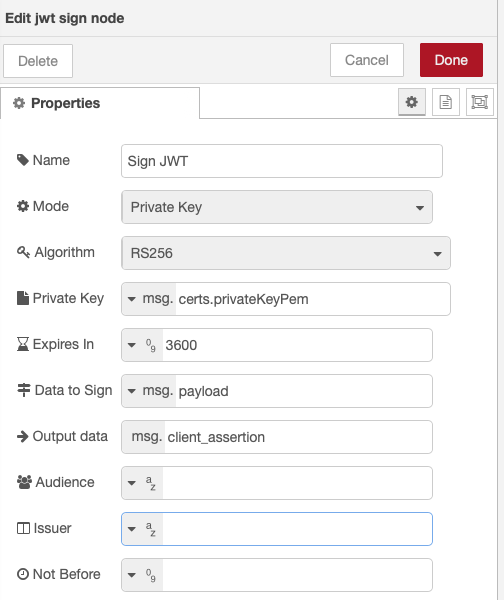
Sign JWT node to sign the JWT token (3)
Function to create the token request (4)
Request node to execute the token request
Switch node based on HTTP status code
Then 2 functions to create a payload to fetch the sentinel alerts and incidents using the assertion token obtained in step 5 (5)
Request node to execute the two functions from step 7
Function node to convert the payload to usable format (6)
Function node to prepare the payload for ingest in elastic (7)
Request node to execute the payload from step 10
Function to get rid of errors caused by duplicate events (8)
Below are the function nodes and input node explained so you should be able to setup this flow yourself. The node-red-contrib-jsonwebtoken is mandatory for this setup and can be installed using the "manage palette" in Node-RED. The request nodes are pretty basic and do not have any specific configuration.
Inject node with tenant information
Create an inject node with following properties, and fill in the information obtained in step "Azure configuration". The retention is used for the loopback time when querying Sentinel for alerts and incidents.

msg.oauth:
{
    "clientId": "xxxxxxx-xxxx-xxxx-xxxx-xxxxxxxxx",
    "tenantId": "xxxxxxx-xxxxxxxx-xxxx-xxxxxxxxxxx",
    "scope": "https://api.loganalytics.io/.default",
    "workspaceId": "xxxxxxxxx-xxxx-xxxx-xxxx-xxxxxxxxx",
    "tenantName": "tenantName"
}
msg.certs:
{
    "privateKeyPem": "-----BEGIN PRIVATE KEY-----\nMyPrivateKeyContents\n-----END PRIVATE KEY-----\n",
    "kid": "kid_value"
}
msg.elastic
{
    "host": "https://elastic.host:9200",
    "apiKeyName": "nodered_azure_api",
    "apiKey": "elastic_api_token_value"
}
Function to create a JWT token
if (!msg.oauth || !msg.oauth.clientId || !msg.oauth.tenantId) {
    node.error("Missing oauth.clientId or oauth.tenantId");
    return null;
}
const now = Math.floor(Date.now()/1000);
const clientId = msg.oauth.clientId;
const tenantId = msg.oauth.tenantId;

function uuidv4() {
  return 'xxxxxxxx-xxxx-4xxx-yxxx-xxxxxxxxxxxx'.replace(/[xy]/g, c => {
    const r = Math.random() * 16 | 0;
    const v = c === 'x' ? r : (r & 0x3 | 0x8);
    return v.toString(16);
  });
}

// Build client assertion claims
msg.payload = {
    iss: clientId,
    sub: clientId,
    aud: `https://login.microsoftonline.com/${tenantId}/oauth2/v2.0/token`,
    jti: uuidv4(),
    iat: now,
    nbf: now
    // exp: now + 600 // <= 10 minutes
};
return msg;
sign JWT token
Create token request
const clientId = msg.oauth.clientId;
const clientSecret = msg.oauth.clientSecret;
const scope = msg.oauth.scope;
const tenant_id = msg.oauth.tenantId;

// Token endpoint (v2)
msg.method  = "POST";
msg.url     = `https://login.microsoftonline.com/${tenant_id}/oauth2/v2.0/token`;
msg.headers = { "Content-Type": "application/x-www-form-urlencoded"};

// Bouw de body handmatig als string:
msg.payload =
  "client_id="     + encodeURIComponent(clientId) +
  "&scope="        + encodeURIComponent(scope) +
  "&grant_type=client_credentials" +
  "&client_assertion_type=urn:ietf:params:oauth:client-assertion-type:jwt-bearer" +
  "&client_assertion=" + msg.client_assertion;

return msg;
Create a payload to fetch the sentinel alerts
Get Sentinel Alerts
// Function node: Build request to Sentinel (Log Analytics) SecurityAlert query
const token = msg.payload && msg.payload.access_token;
const workspaceId = msg.oauth && msg.oauth.workspaceId;
let retention = msg.retention || "12h"; // default if not provided

if (!token) {
    node.error("No access_token found in msg.payload", msg);
    return null;
}


// Prepare the POST request
msg.method  = "POST";
msg.url     = `https://api.loganalytics.azure.com/v1/workspaces/${workspaceId}/query`;
msg.headers = {
    "Authorization": "Bearer " + token,
    "Accept": "application/json",
    "Content-Type": "application/json"
};

// KQL query: last 24h alerts
msg.payload = {
    query: `SecurityAlert | where TimeGenerated > ago(${retention}) | take 1000`
};


return msg;
Get Sentinel incidents
// Function node: Build request to Sentinel (Log Analytics) SecurityAlert query
const token = msg.payload && msg.payload.access_token;
const workspaceId = msg.oauth && msg.oauth.workspaceId;
let retention = msg.retention || "12h"; // default if not provided

if (!token) {
    node.error("No access_token found in msg.payload", msg);
    return null;
}


// Prepare the POST request
msg.method  = "POST";
msg.url     = `https://api.loganalytics.azure.com/v1/workspaces/${workspaceId}/query`;
msg.headers = {
    "Authorization": "Bearer " + token,
    "Accept": "application/json",
    "Content-Type": "application/json"
};

//KQL query: last 24h alerts
msg.payload = {
    query: `SecurityIncident | where TimeGenerated > ago(${retention}) | take 1000`
};

return msg;
convert the payload to usable format
// Function node: Convert Log Analytics response to array of objects

if (!msg.payload || !msg.payload.tables || !msg.payload.tables[0]) {
    node.error("Unexpected response format", msg);
    return null;
}

const table = msg.payload.tables[0];
const cols = table.columns.map(c => c.name);
const rows = table.rows;

const result = rows.map(r => {
    const obj = {};
    cols.forEach((c, i) => { obj[c] = r[i]; });
    return obj;
});

// Only return if not empty
if (result.length === 0) {
    return null;   // nothing to send
}
msg.payload = result;


// List of nested JSON fields we want to auto-parse
const fieldsToParse = ["Owner", "AlertIds", "AdditionalData","ExtendedProperties","Entities"];

if (Array.isArray(msg.payload)) {
    msg.payload.forEach((item, idx) => {
        fieldsToParse.forEach(field => {
            if (item && typeof item[field] === "string") {
                const s = item[field].trim();
                if ((s.startsWith("{") && s.endsWith("}")) || (s.startsWith("[") && s.endsWith("]"))) {
                    try {
                        item[field] = JSON.parse(s);
                    } catch (e) {
                        node.warn(`Element ${idx} field '${field}' not valid JSON`);
                    }
                }
            }
        });
    });
}

return msg;
prepare the payload for ingest in elastic
var data = msg.payload;
const stream = "logs-azure_api";
const pipeline = "logs-azure_api";

msg.elastic = msg.elastic || {};
msg.elastic.host = msg.elastic.host;

const tenantName = msg.oauth && msg.oauth.tenantName ? msg.oauth.tenantName : null;

// Recursive cleaner: remove keys with null, undefined, or empty string
function clean(obj) {
  if (Array.isArray(obj)) {
    return obj
      .map(clean)
      .filter(v => v !== null && v !== undefined && v !== "");
  } else if (obj && typeof obj === "object") {
    const newObj = {};
    for (const [k, v] of Object.entries(obj)) {
      if (v === null || v === undefined || v === "") continue;
      newObj[k] = clean(v);
    }
    return newObj;
  }
  return obj;
}

const lines = [];

for (let doc of data) {
  // Use EndTime as @timestamp if available, else fallback to now
  if (doc.EndTime) {
    doc['@timestamp'] = new Date(doc.EndTime).toISOString();
  } else {
    doc['@timestamp'] = new Date().toISOString();
  }

  // Add tenantName if present
  if (tenantName) {
    doc.customer = doc.customer || {};
    doc.customer.name = tenantName;
  }

  // Clean doc before indexing
  doc = clean(doc);

  const action = { create: { _index: stream } };
  if (doc.SystemAlertId) {
    action.create._id = String(doc.SystemAlertId);
  }
  else if (doc.IncidentName) {
    action.create._id = String(doc.IncidentName);
  }

  lines.push(JSON.stringify(action));
  lines.push(JSON.stringify(doc));
}

msg.payload = lines.join('\n') + '\n';

msg.headers = {
  "Authorization": `ApiKey ${msg.elastic.apiKey}`,
  "Content-Type": "application/x-ndjson"
};

msg.method = "POST";
msg.url = `${msg.elastic.host}/_bulk?pipeline=${encodeURIComponent(pipeline)}`;

return msg;
Remove 409 errors in log (document already exist)
// Function: filter out 409 "document already exists" from ES _bulk response

let body = msg.payload;

// Normalize payload to an object
if (Buffer.isBuffer(body)) {
  body = body.toString("utf8");
}
if (typeof body === "string") {
  try { body = JSON.parse(body); }
  catch (e) {
    node.error("Bulk response is not valid JSON", msg);
    return null;
  }
}

const items = Array.isArray(body.items) ? body.items : [];

const keptItems = [];
const conflicts = [];
const failures  = [];
const created   = [];

for (const it of items) {
  const op = it.create || it.index || it.update || it.delete || {};

  // Classify
  if (op.status === 409) {
    conflicts.push(op); // doc existed -> benign duplicate
    continue;           // DROP 409 from the final payload
  }
  if (op.status === 201 || op.result === "created") {
    created.push(op);
    keptItems.push(it);
    continue;
  }
  if (op.status >= 400) {
    failures.push(op);     // keep non-409 errors visible
    keptItems.push(it);
    continue;
  }

  // 2xx other than 201, or anything else -> keep
  keptItems.push(it);
}

// Recompute errors flag: true only if non-409 failures exist
const hasRealErrors = failures.length > 0;

const cleaned = {
  ...body,
  items: keptItems,
  errors: hasRealErrors
};

// Attach summaries
msg.bulkSummary = {
  took: body.took,
  ingest_took: body.ingest_took,
  total_items: items.length,
  created: created.length,
  conflicts: conflicts.length,   // dropped from payload
  failures: failures.length,     // still present in payload
  errors: hasRealErrors
};

// Keep raw lists if you want to route/log them
msg.conflicts = conflicts;
msg.failures  = failures;

// Final cleaned payload (no 409s in items)
msg.payload = cleaned;

return msg;
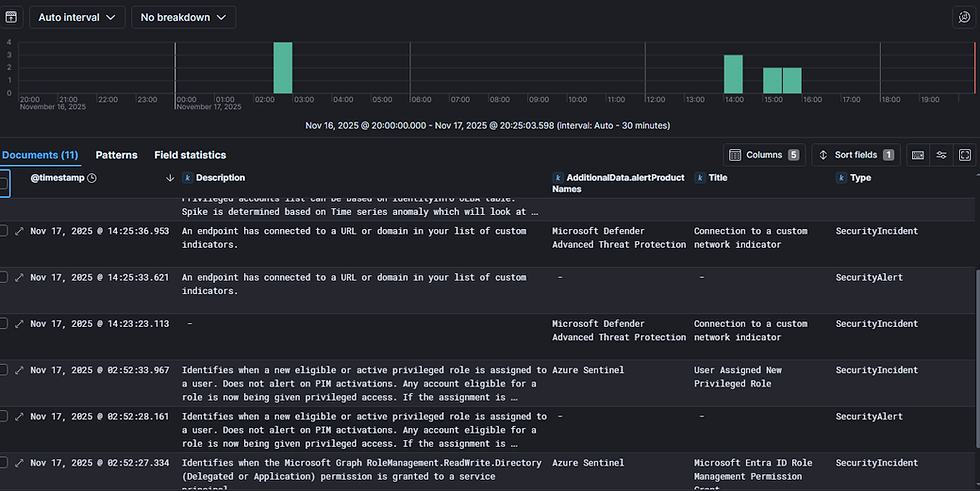
Result in elastic